

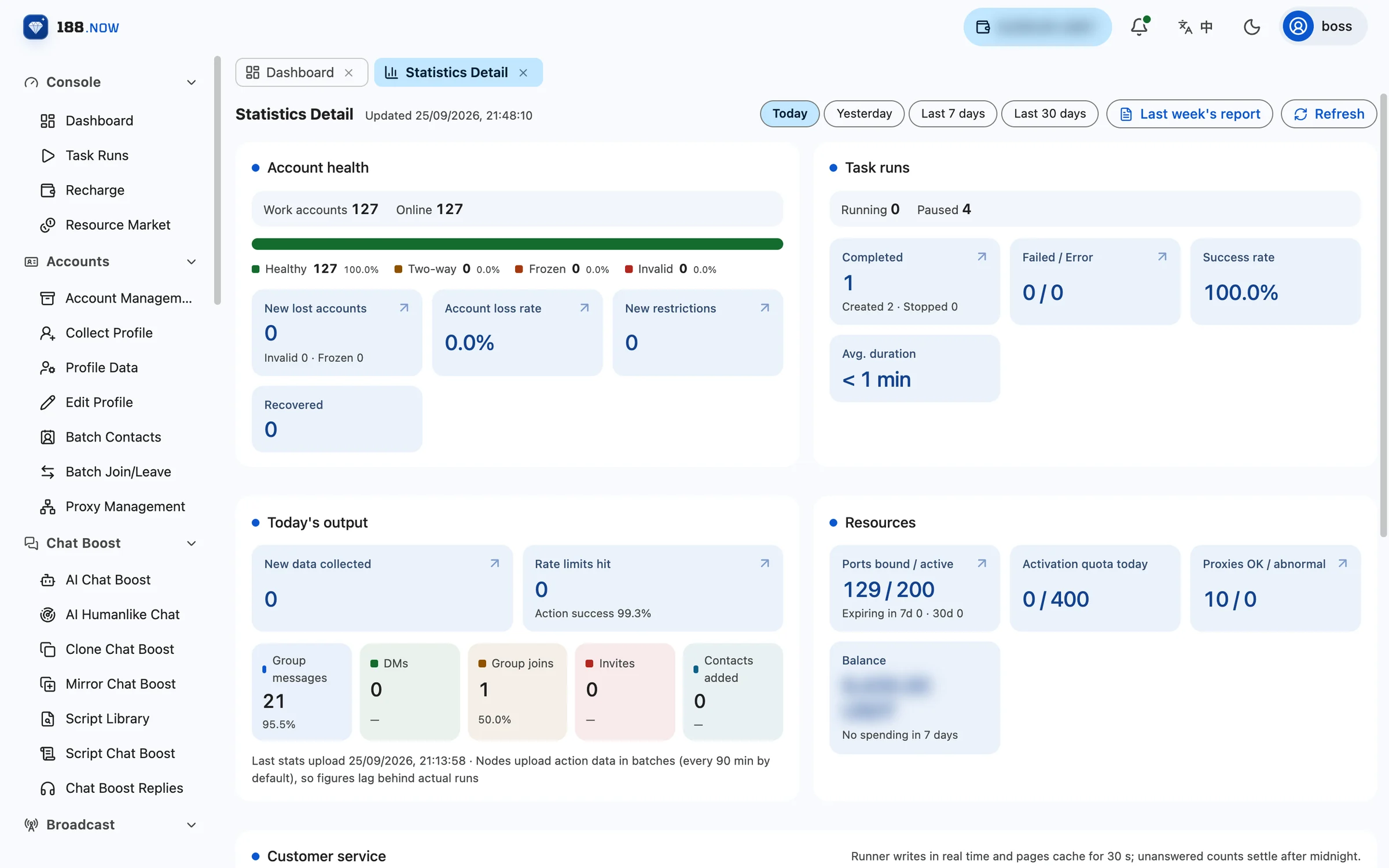
Statistics Detail sits under the Statistics menu of the workspace and puts the numbers you check most often on one page, so you do not have to jump between screens.
Account health
Shows the number of work accounts and how many are online, with a segmented bar for the share of healthy, two-way restricted, frozen and invalid accounts; below it are new lost accounts, the lost-account rate for the period, new restrictions and recoveries.
Task runs
The number of running and paused tasks, plus completed runs, failures / errors, success rate and average duration.
Today’s output
New collected data, rate-limit hits and action success rate, with volume and success rate broken down by group messages, DMs, group joins, invites and contacts added.
Resources and customer service
The resources card shows bound / active ports and ports about to expire, today’s enable quota, healthy / failing proxies and your balance; the customer service card shows conversations handled, the 5-minute response rate, average first human response and today’s unreplied count.
How often the data updates
Action data is uploaded in batches by each execution node on a cycle, every 90 minutes by default, so the numbers lag slightly behind actual execution; the page shows when the last upload arrived.
When you need to dig deeper
Statistics Report covers account survival, lost-account details, task runs, account productivity, rate limits and risk, resource spending, data assets, customer service and weekly ops reports, broken down by account group, proxy, country, account age and more.